Find your way around Business and Settings
When to use this
Use this page to learn where configuration lives, so you can jump straight to the right place later. There are two areas, and the split is simple: Business is what defines your studio to clients and how you get paid. Settings is about you: your account, your BloomBoard plan, and the apps connected to your own login.
Two areas, one layout
Both areas open inside the app, so the main navigation stays where it always is and you can hop back to your events, library, or documents at any time. Both sit at the bottom of the main navigation, Business directly above Settings. Your avatar opens Settings too.
On desktop, a grouped sidebar organizes each area’s pages; on a phone, you get a tappable index instead. The fastest route anywhere is search: press / (or the search button) in either area and type what you are after. Search covers both areas at once, so “password” from Business finds Change password under a Settings · Account heading. Results include the individual sections on each page, so “domain” brings up Your domain under Branding and “deposit” brings up the deposit settings on both Invoices and Payment schedule. Pick one and the page scrolls straight to that section and highlights it for a moment.
On a phone, an open page shows ‹ Business or ‹ Settings at the top left. Tap it to go back to the index. Search has a Cancel button beside the field to close it.
⌘K opens the BloomBoard assistant everywhere in the app, these areas included. Search is on / so the two never collide.
The chevron at the top of the sidebar folds it away when you want the room, useful on the wider pages like the brief editor. A slim strip stays at the left edge; its chevron brings the menu back, and BloomBoard remembers which way you left it.
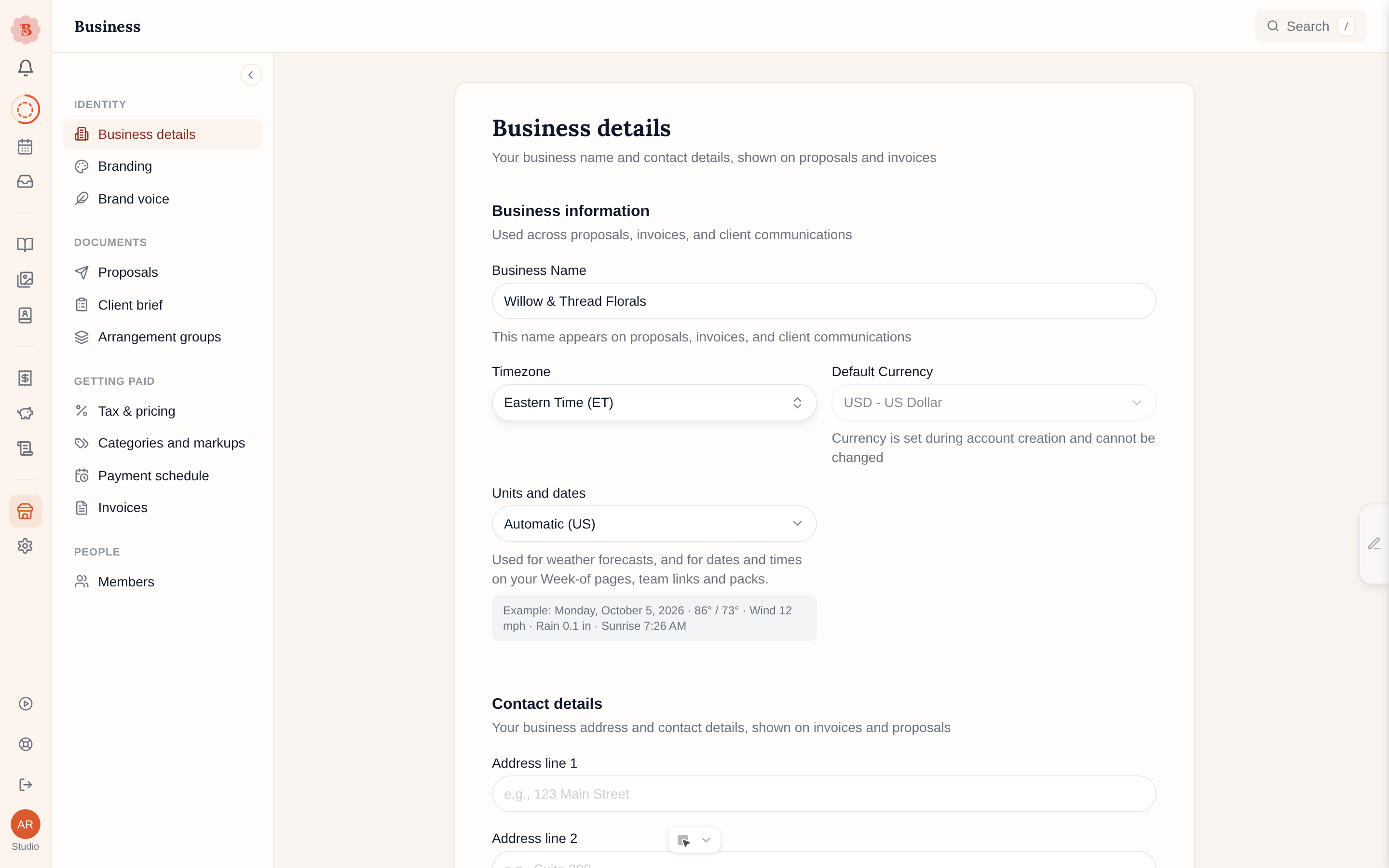
Business
Identity
- Business details: the studio’s name, contact details, country, and the currency your proposals and invoices use. Search the country picker and choose the matching country from the list; this also anchors venue search to your country, and the city or postal code pulls results towards your studio. The business email here is where client replies to proposals, invoices, and brief requests arrive; leave it blank and replies go to the account owner’s login email instead. Timezone sets the clock for reminders, the morning digest, the assistant and the Week-of “Now” task. BloomBoard sets it from your browser the first time an owner or admin signs in, so you only change it if it is wrong. Search the picker by city, for example “Phoenix” or “Toronto”. A timezone you pick yourself stays as you set it. Units and dates sets how weather and every date and time read: US (°F, mph, inches, “Oct 5”, “3:00 PM”, weeks start on Sunday) or Metric (°C, km/h, mm, “5 Oct”, “15:00”, weeks start on Monday). It starts on Automatic, which follows your business location. Search “units”, “fahrenheit” or “date format” to find it. See Venue addresses and weather. The examples in the address and phone fields also follow your location, for example “Austin” and “78701” for a US studio.
- Branding: two tabs. Brand kit holds your logo, your three brand colors (accent, background, ink), and your business website, reflected on proposals and other client-facing documents. What clients see holds the Studio-plan custom branding surfaces: branded emails, favicon and link previews, and your own web address. See Custom branding.
- Brand voice: teach BloomBoard your studio’s way with words, so drafted text reads like you wrote it. See Brand voice.
Pipeline
- Enquiry form: what visitors fill in from your public enquiry link. Your link comes first, with the link, its QR code, Pause and Get a new link. Once the pipeline is on, Share it in more places gives the link a version per placement. Occasions has one row per occasion your link offers: the words visitors see, the form it asks, and, when those features are on, the Lead column it lands in and the automations that start. Contact details decides whether visitors must give a phone number. The page saves as you go. It is part of every plan. See Capture enquiries with your public link.
- Forms: called Client briefs until Forms are switched on for your studio. Your forms (Your briefs before Forms) lists every form you can send, and on the Studio plan opens the editor: reword, reorder, require, hide, or add your own questions. Budget question holds the budget ranges every form offers, with a live preview, the minimum spend that trims them, and whether clients must choose a budget. The page saves as you go. With Forms on, Copy link beside a form makes that form’s link for one event. See Forms.
- Price guide: appears when the price guide is switched on for your studio. It holds your pieces and their price ranges, with a live view of what clients see beside them. See Show a price guide on your website.
- Automations (appears when automations are on for your account): the steps BloomBoard takes for you as an event moves along, such as a welcome email or a reminder. See Automations.
- Task lists (appears when task lists are on for your account): saved lists of tasks you add to an event in one go. See Task lists.
- Stages (appears when the pipeline is on for your account): your own steps inside the statuses the board already has. The Lead card also holds Reply time: how many hours an enquiry can wait for a reply before its card turns amber. See Pipeline.
- Lead sources (appears with the pipeline too): where enquiries come from, the reasons you mark them lost, and the tags you use on events.
Documents
- Proposals: proposal defaults, the page size new proposal documents start with, and how long a proposal stays open for signing. The page size starts on Automatic, which names its choice, for example Automatic (US Letter, based on your location). It picks US Letter for the US, Canada, Mexico and a few other countries in the Americas, and A4 everywhere else. Your location is the Country in Business details, else the country you signed up from, else the country your currency points to. A change applies to new proposals only.
- Arrangement groups: the studio-wide areas your arrangements organize into, such as Personal Flowers, Ceremony, and Reception.
- Saved emails (Studio): emails you send often, with fields that fill themselves. Opens as a workspace of its own with a back link to Business. See Saved emails.
Getting paid
- Tax & pricing: tax rates, the default tax for each kind of line, and tax registration. See Set up tax. The labels use the name of your tax, which follows your location: Sales tax in the US and Canada, GST in Australia and New Zealand, and VAT everywhere else. A US studio sees Sales tax registration and Sales tax number. The same name appears beside your tax number on invoices.
- Categories and markups: your item categories, a markup for each, and what happens to each category’s leftovers. Other markups holds the markups for Services (team and labor) and Operational costs (transport, travel). New events start with these markups, and you can change them on each event. See Categories and markups.
- Payment schedule: your default milestone split, used by new events, including whether the first payment is collected the moment a client accepts (Collect on acceptance).
- Invoices: invoice numbering (with a live example of what your numbers will look like), the default deposit percentage, and the payment terms text new invoices start with.
- Client payments: how your clients pay you. Connect Stripe or Yoco for card payments, choose whether to add a card processing fee, and enter the bank details shown on every payable invoice. A bank transfer a client reports waits for you on the invoice and on Today, not here. See Set up online payments.
People
- Members: who can sign in to this account, and pending invitations, together on one page. Invite teammates as admin or staff. This is different from the Team page in the Directory, which is the roster of people who work your events.
Every Business page is studio-wide, so changes affect the whole team. Pages that need admin rights say so, and staff see a notice instead of the controls.
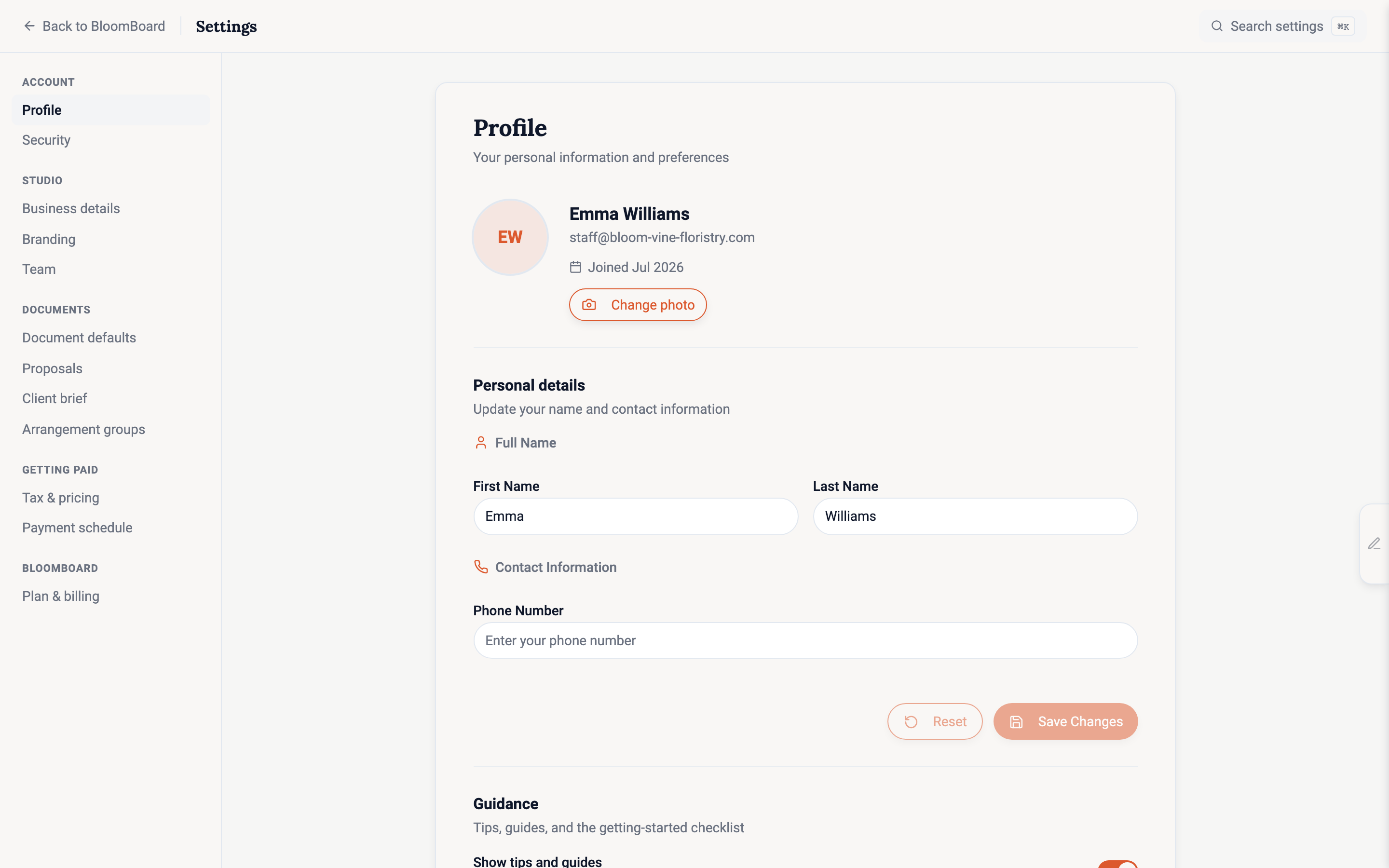
Settings
Account
- Profile: your name, avatar (if you signed in with Google, your Google photo is used until you upload your own), and the guidance controls, including the switch for tips and the option to restore the getting-started guide.
- Security: password and active sessions, including signing out other devices. Each session names the browser and the system, such as “Safari on iOS”, with a phone or computer icon. A session that started before this label existed can keep an older label until you sign in again on that device.
BloomBoard
- Plan & billing: your account details, subscription and usage, payment methods, and billing history, all on one page.
- Your data: download a complete copy of your workspace, records, documents, and images, whenever you want. See Export your data.
Connected apps
These pages appear when the matching feature is on for your account. Each one links something that belongs to you personally, not to the studio.
- Email: connect your own Gmail or Microsoft 365 mailbox so client email sends from your address and replies land in it, set the signature added under every email you write from BloomBoard, and paste the booking link your saved emails can use.
- WhatsApp assistant: link your phone number to talk to your assistant on WhatsApp.
- Canva: connect your Canva account to import designs into proposals and keep them synced, and disconnect it again. See Bring your Canva designs into proposals.
- ChatGPT and Claude: see and disconnect the assistants that can read your studio. Owners and admins see every member’s connections; staff see their own. A connected assistant never sends to your clients, takes payments or deletes anything. See Connect BloomBoard to ChatGPT or Claude.
Bookmarks and links to the old Settings addresses still work. A page that moved to Business opens there automatically. A link to the old Client brief page opens the page that holds that part now: Enquiry form, Price guide, Forms or Stages.