Track your finances and enquiries
When to use this
Use this page to understand the account-level Analytics area (called Finances until September 2026): the view of your whole business’s money, across every event, and of where your enquiries come from.
The money views (Today, Performance, Pipeline, Tax & Exports) are part of the Studio plan. On other plans the page shows what they offer and how to upgrade. The Enquiries view is on every plan once stages are switched on for your studio, so a Core studio sees Analytics with that one tab live.
Today
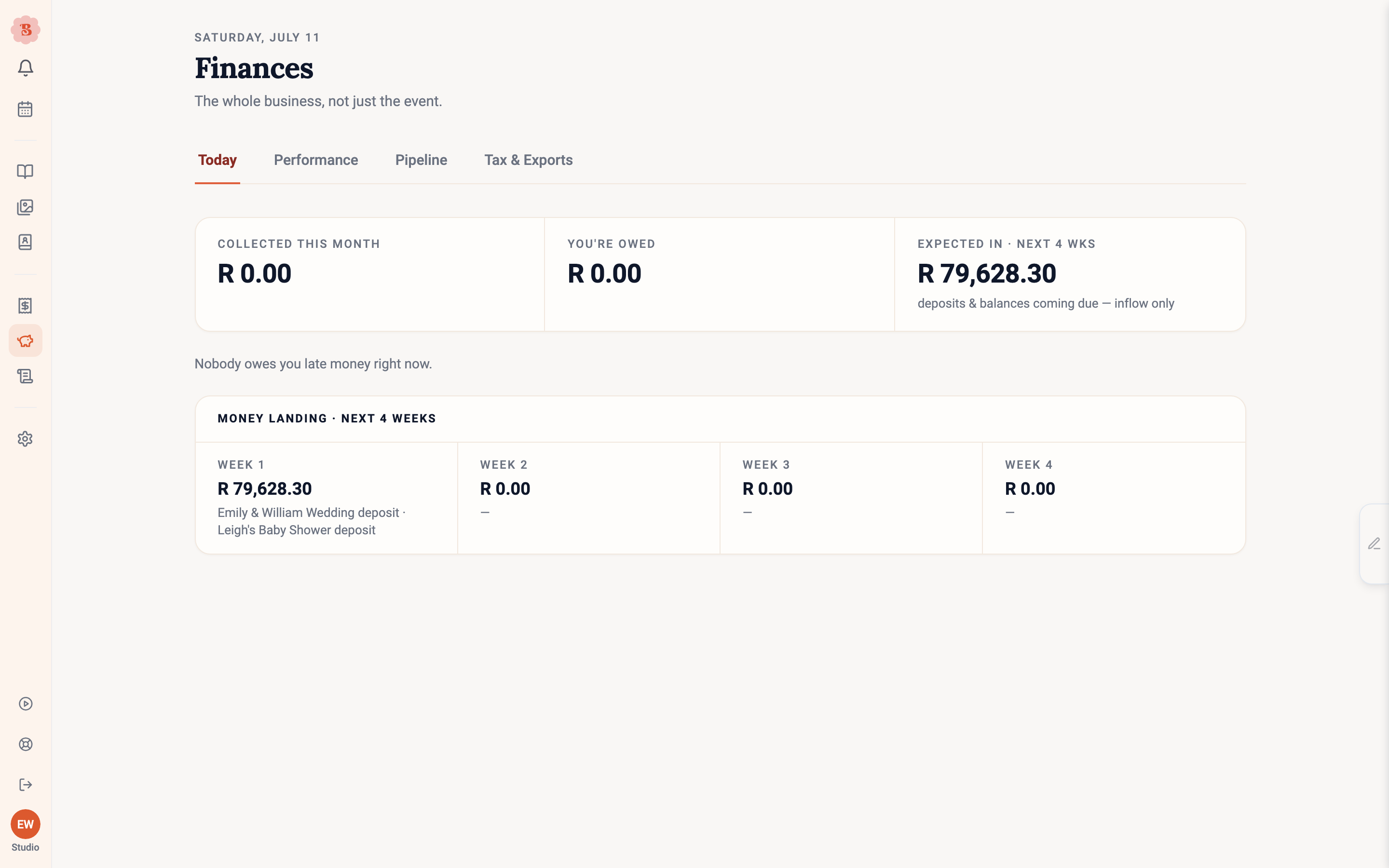
The Today view is the morning check-in: headline tiles for where cash stands, Chase these first for the invoices most worth a nudge, Coming due for what is about to land, a four-week view of money landing, and Wrap-ups waiting for completed events whose books still need closing, each with a Wrap up link to that event’s wrap-up. Chase opens the invoice’s reminder email, where you can change the message and preview it before it goes; see Bill and get paid on an event. One reminder goes in any 24 hours, so nobody gets double-chased.
Performance
Performance looks backwards: pick a period (or a custom range) and switch between what you collected and what you billed. You get the year-on-year cash trend, whether each event paid, margin by event type, your best clients, and how the seasons treat you. If some lines have no cost data, a chip warns you that the margin is only as good as the costing behind it.
Three habits keep those numbers honest:
- A dash, not a zero. Where the cost of an event is unknown, the row shows a dash. An unknown cost is never quietly counted as nothing.
- Margin is withheld when the costing is too thin. If more than half of an event’s estimated cost has been inferred from selling prices rather than real costs, BloomBoard holds the margin back until the estimate is reliable enough, and tells you that is why.
- Planner commission comes off first. Where an event carries a planner commission, the row names the amount and deducts it before margin is worked out.
On the Studio plan, the assistant can read your Today and Performance figures too. Ask it, for example, “what was my margin on each event this quarter?” and it answers from the same numbers as these views. It reads the Pipeline, Tax and Enquiries tabs as well, and with a tab open it uses the same period and figures as the page. The accountant export stays on the Tax & Exports tab.
Pipeline
Pipeline looks forwards: the open pipeline value, a weighted planning figure based on your actual win rate, and the forward order book for the next six months. Needs a nudge surfaces proposals worth reminding, and Finish & send links jump straight into the events that are nearly ready to go out.
Tax & Exports
The tax view totals the tax you have charged, broken down by rate.
Every figure comes from what was saved on each invoice line at the time, not from a rate applied afterwards. That is why the breakdown can hold rows that are not percentages:
- Non-taxable sales — lines that were marked as carrying no tax.
- No tax · legacy invoice — older invoices kept only a total, with no way to tell an exempt sale from a zero-rated one. BloomBoard keeps that uncertainty rather than inventing a 0% rate.
- Rate unavailable — tax was recorded, but the rate behind it cannot be read back.
If some invoices cannot be matched to a rate at all, a Tax allocation needs review panel lists how much net and how much recorded tax is affected. Those amounts stay inside Billed — nothing is dropped from your totals — and no rate has been guessed for them. Take that panel to your accountant along with the export.
Drafts are excluded from Billed and from the tax breakdown. Voided invoices are shown on their own line, because the record cannot tell a refund from a write-off.
The view names your tax the way your settings do: sales tax in the US and Canada, GST in Australia and New Zealand, and VAT everywhere else. See Find your way around Business and Settings.
If your studio is not registered for the tax, any taxes already saved on past invoices are still shown. Changing your registration does not rewrite history.
The Export pack downloads a ZIP of CSVs covering your invoices and payments for the range you choose, ready for a bookkeeper or spreadsheet. Two things to expect when you open it:
- The invoices register includes drafts and voids as well as sent invoices. Filter its status column when you want billed totals only.
- Every row carries its own currency, so nothing is mixed together.
Enquiries
Enquiries answers the questions florists otherwise keep in a spreadsheet. It appears once stages are switched on for your studio (see Stages, sources and the age of an enquiry). Pick 90 days or 12 months, then read:
- Four headline figures. How many enquiries arrived, how many of the decided ones booked, the median time to your first reply, and the median days from enquiry to booked.
- Enquiries by month. Hover over a bar, or tap it on a phone, for the split by the link they used.
- Found us via and Heard about us from, side by side. The first is measured from your share links; the second is what clients told you. The difference between them is the point of the page.
- Why we lost them. Lost reasons for the period.
- Conversion by source. Enquiries, booked, the rate and the median value for each answer to “How did you hear about us?”.
A rate only appears once there are enough decided enquiries for it to mean something; until then the row says too few to say, the same rule the Pipeline view uses. Figures come from each event’s recorded history, so correcting a source later does not rewrite an earlier period: a source you correct after the month of arrival has closed leaves that month’s report as it was, except for an enquiry that arrived with no source at all, where the correction fills the gap. A line under the headline figures tells you the date conversion counts from.
Export CSV downloads one row per enquiry for the period: when it arrived, the client, the occasion and date, both sources, the stage and status, the hours to first reply, when it booked, and the lost reason and note.
One honest number, everywhere
Figures here reconcile with the events underneath them: an invoice total on an event matches what Today reports, and anything in a different currency is counted separately and said so, rather than silently mixed in.